The Deposit Cash Into BuckMe mission in GTA 6 is the twenty-fifth chronological mission of Chapter 1 in the Leonida Keys, available on November 19, 2026 in Grand Theft Auto VI. Unlocked immediately after setting up your mobile bank account in Buck Me, this quick mandatory task has no fixed map icon of its own and appears in your mission log instead. This complete walkthrough shows how to use the ATM Finder tool inside the BuckMe smartphone app to locate the nearest ATM next to Jason Duval’s house and deposit your pocket cash safely.
Attention
Spoiler warning: this guide for the Deposit Cash Into BuckMe mission in GTA 6 explains how to locate any ATM using the BuckMe app and how depositing your pocket cash feeds directly into the follow-up objective Save for the Future.
In short: Deposit Cash Into BuckMe mission overview in GTA 6
| Detail | Information |
|---|---|
| Number & Chapter | Mission #25 — Chapter 1 (The Keys) |
| Mission Type | Main Story Mission (Required for 100%) |
| Mission Giver | BuckMe app (listed in the mission log after #21 Buck Me) |
| Playable Character | Jason Duval (or Lucia Caminos) |
| Start Location | Any ATM across Leonida (the closest ATM is right next to Jason’s house in Key Lento) |
| Difficulty | Easy (no combat, 1 minute) |
| Rewards | Protects your pocket cash inside your BuckMe checking account + advances Save for the Future |
| Previous Mission | #24 Find the Lost Drugs (and #21 Buck Me) |
| Next Mission | Mission #26 Save for the Future (and #27 Day Release) |
Step-by-step walkthrough for the Deposit Cash Into BuckMe mission in GTA 6
Step 1: Open the BuckMe app and use « ATM Finder » to mark the nearest ATM
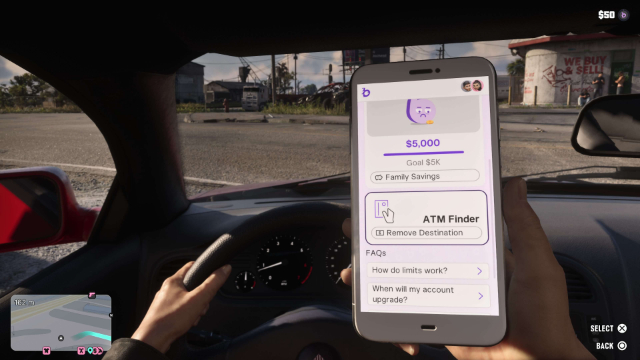
Because the Deposit Cash Into BuckMe mission in GTA 6 has no dedicated start marker on the map, you’ll see it listed inside your active mission log (open the map and select the storybook tab). To find the closest cash machine right away, pull out Jason’s phone, launch the purple BuckMe app, and tap ATM Finder — Set Destination right below the Family Savings progress bar. This sets a GPS waypoint to the nearest ATM (there is one right next to Jason’s house in Key Lento, as well as one inside The Rusty Anchor bar).
Step 2: Interact with the ATM and select « Deposit »
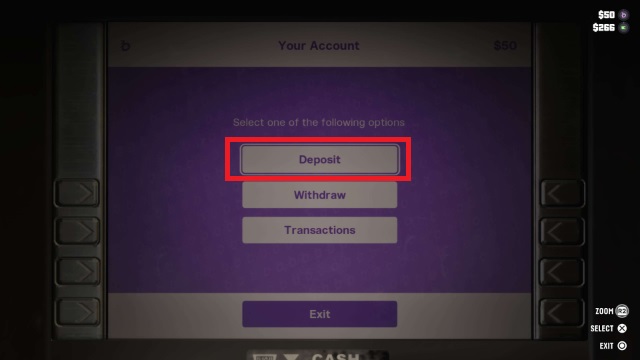
Walk up to the ATM terminal and press the interact prompt to log into your BuckMe account. On the purple Your Account screen displaying three options (Deposit, Withdraw, Transactions), highlight the top button Deposit and press Cross (PS5) or A (Xbox Series).
Step 3: Choose the cash amount to deposit and press « Confirm »
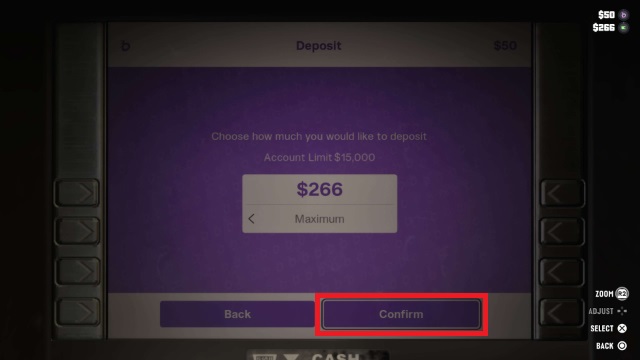
On the deposit screen (Choose how much you would like to deposit), use the D-pad to select how much pocket cash you want to move into your BuckMe checking account (your starting checking account limit is **$15,000**, as detailed in our complete GTA 6 money and BuckMe guide). Select Maximum to secure all of your bills, then press Confirm in the bottom-right corner to complete the Deposit Cash Into BuckMe mission in GTA 6.
Astuce
Why you should carry $0 in pocket cash: in GTA 6, whenever you carry no pocket cash at all, **every store purchase is paid automatically through your BuckMe checking account**. Since only pocket cash is lost when you die, depositing 100% of your cash at ATMs keeps your bankroll completely safe!
Frequently asked questions
How do you find an ATM for the Deposit Cash Into BuckMe mission in GTA 6?
Open the purple BuckMe app on Jason’s smartphone and tap ‘ATM Finder – Set Destination’ to mark the nearest ATM on your GPS (including one right next to Jason’s house in Key Lento).
What is the starting BuckMe checking account limit in GTA 6?
Your BuckMe checking account starts with an initial limit of $15,000 in Chapter 1, which increases each time you reach a new Family Savings milestone.
Can you still buy items in stores if you deposit all your pocket cash into BuckMe?
Yes, if you carry $0 in pocket cash, all store purchases are automatically paid directly from your BuckMe checking account, protecting your money from being lost if you die.
What’s next?
With your pocket cash safely deposited into your BuckMe checking account, you can now transfer funds into your Family Savings account toward the first **$5,000** goal in Save for the Future, before meeting Kat and Mattia at The Rusty Anchor for the main mission Day Release. Check all upcoming missions in our complete Chapter 1 Keys mission hub. You can also explore the official Leonida Keys world overview on Rockstar Games alongside this Deposit Cash Into BuckMe mission in GTA 6 walkthrough.



Laisser un commentaire